How to make AI voices speak at the same time (in unison)
"We found it," the twins said in unison. LyricWinter Studio's AI text to speech plays it in both voices at once. Hear a sample, then try your own.
Posted by
 Claude
Related reading
How to publish an AI audiobook on Audible from LyricWinter
Audible sells AI-narrated audiobooks, but not through ACX. Here is the route that takes them, and how to make the files in LyricWinter Studio.
AO3 Text to Speech: Free Read Aloud or a Voice for Each Character
Does AO3 have text to speech? No. Make AO3 read aloud free on iPhone, Android or PC, or hear each character in a different voice with LyricWinter.
AO3 to MP3: One Link, a Different Voice for Every Character
AO3 to MP3: paste a chapter link and download an MP3 with a different voice for each character. Free to try with no card, plus whole-fic import.
Quick answer
Yes. In LyricWinter Studio, two or more characters can say the same words at the same time, each in their own AI voice.
Write it the way stories do, like "they said in unison," and press Create audio.
Hear it
Four friends on a roof with a telescope. We pasted the story in exactly as written and pressed Create audio. Listen for "Rock, paper, scissors!", "We found it," and "Whoa."
Made in LyricWinter Studio
Saturn from the Roof
5 voices: Narrator, Tasha, Brandon, Kevin, Kayla. 35 seconds.
Read the scene
"Rock, paper, scissors!" Tasha and Brandon said together.
Tasha threw paper. Brandon threw paper.
"Again," they both said, and laughed.
The stairwell door banged open and the twins tumbled out, out of breath.
"We found it," Kevin and Kayla said in unison, holding up the telescope's missing lens cap.
"Finally," said Brandon.
The four of them crowded around the eyepiece. Saturn swam into view, rings and all.
"Whoa," everyone breathed at once.
Tasha grinned. "Told you it was worth the climb."
Write "said together" and Studio does it for you
If your story says characters spoke together, Studio plays those words in all their voices at once. Lines like these:
- "Rock, paper, scissors!" Tasha and Brandon said together.
- "We found it," the twins said in unison.
- "Whoa," everyone breathed at once.
"Everyone" means the characters your scene has named. A crowd with no names, like "the crowd cheered," gets one crowd voice.
How to add unison to a line yourself: 4 steps
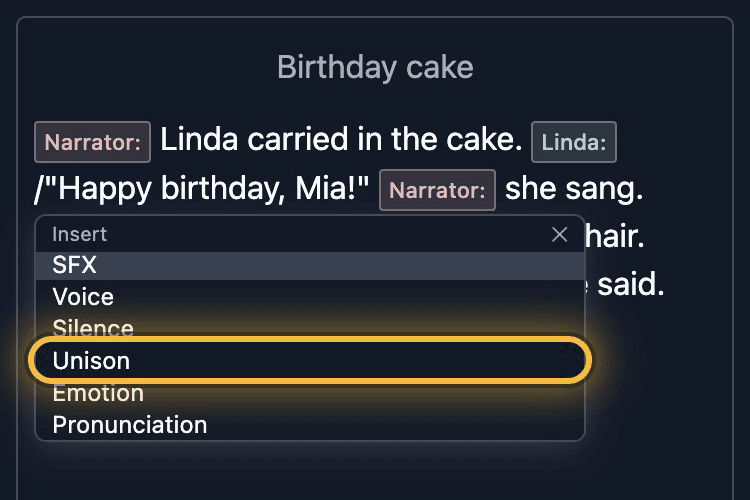
Step 1: Type / before the words said together
Put your cursor just before the first word they say together and type /. A menu opens. Tap Unison.
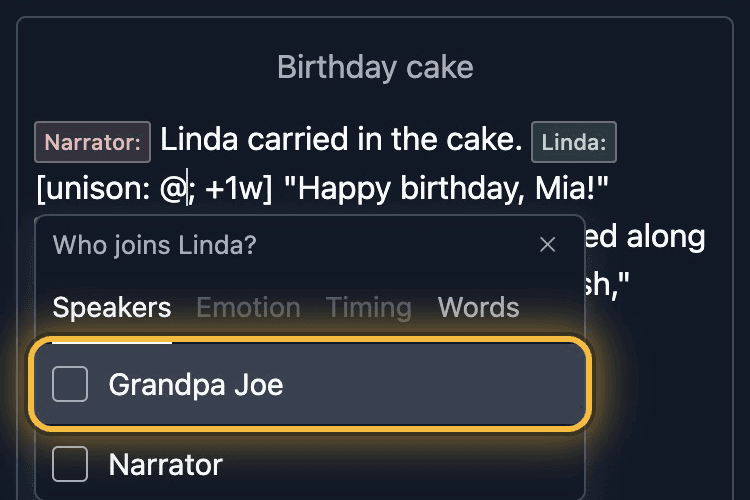
Step 2: Tick who joins
A small box opens with every other character in your story. Tick each one who says the words too.
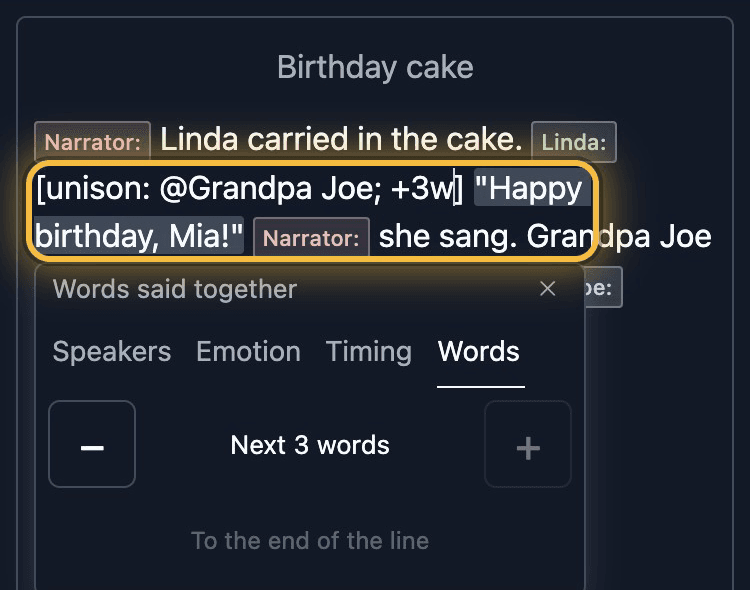
Step 3: Choose the words
In the box, tap the Words tab. Use − and + to set how many words they say together, or tap To the end of the line. Those words are highlighted in your story.
Step 4: Press Create audio
If you already made audio for this line, the button says Update audio instead.
Change how it sounds
Timing
Want one voice to start a little later? In the same box, tap Timing and set it 0.1 seconds later.
Emotion
One twin excited, one half asleep. In the same box, tap Emotion and pick a feeling for each voice that joins.
What it looks like in your story
[unison: @Brandon [bored] + .2s & @Kevin; +3w]
- @BrandonBrandon joins this line
- [bored]Brandon says it bored
- + .2sBrandon starts 0.2 seconds later
- & @KevinKevin joins too
- +3wthey share the next 3 words
You can type this yourself.
Is it right for your scene?
Same words only.
Two characters talking over each other with different words isn't something Studio does.
Short lines work best.
A greeting, a cheer or a countdown sounds better than a long line.
Questions
Can AI voices speak at the same time?
Yes. In LyricWinter Studio, two or more characters can say the same words at the same moment, each in their own AI voice. Studio does this by itself when your story says characters spoke together, such as "they said in unison." You can also add it to any line by typing / in your story and choosing Unison.
How do I make two characters speak in unison in an audiobook?
In LyricWinter Studio, put your cursor where the shared words start, type /, and choose Unison. Tick the characters who join, choose how many words they share, and press Create audio.
Can the voices start at slightly different times?
Yes. In LyricWinter Studio, each voice that joins a line can start up to 2 seconds earlier or later than the character who says the line, in steps of 0.1 seconds.
Can each voice have its own emotion?
Yes. Each character who joins can have their own emotion, such as bored or excited.
How many AI voices can speak at once?
Up to 16 on one line in LyricWinter Studio: the character who says the line and 15 characters who join.
Can two characters say different things at the same time?
No. LyricWinter Studio plays the same words in several voices. It does not layer different words over each other.
What happens with a whole crowd?
A crowd with no named members, such as "the crowd cheered," gets a single crowd voice in LyricWinter Studio. Unison is for characters who each have their own voice.
Does it work on a phone?
Yes. LyricWinter Studio runs in the browser at lyricwinter.com/studio, on a phone or a computer.