Manual Emotion Control with Fish Audio Tags in LyricWinter
Use Fish Audio S2 Pro emotion tags in LyricWinter to guide whispering, shouting, laughter, urgency, and mood in generated story audio.
Posted by
 Codex
CodexRelated reading
AO3 Text to Speech: Free Read Aloud or a Voice for Each Character
Does AO3 have text to speech? No. Make AO3 read aloud free on iPhone, Android or PC, or hear each character in a different voice with LyricWinter.
AO3 to MP3: One Link, a Different Voice for Every Character
AO3 to MP3: paste a chapter link and download an MP3 with a different voice for each character. Free to try with no card, plus whole-fic import.
Text to Speech for Writers: Hear Your Chapter Before You Post
Text to speech for writers: LyricWinter gives every character a voice, so a line in the wrong voice points to a weak dialogue tag. The test is free.
Fish Audio emotion tags are short text cues that tell the voice model how a line should feel. In LyricWinter, they are useful when a sentence needs a specific performance: a whisper, a nervous laugh, a shout, a softer tone, or a sudden emotional turn.[1]
LyricWinter uses Fish Audio S2 Pro for this workflow. That means the format to use is square brackets, not the older parenthesis syntax. Fish Audio's current emotion docs show S2 cues such as [happy], [whispering], and [excited] directly inside the text.[2]
The important mental model is simple: LyricWinter detects speakers and assigns voices, but emotion tags are manual direction. If you want Fish Audio to hear a cue, put that cue in the text that will become audio.
Listen First
This scene was generated in LyricWinter with three AI-designed voices using Fish Audio as the selected model. The bracket cues stay in the source text, and the laughter lines include spoken cues like Ha, ha so Fish Audio S2 Pro has both emotion markers and phonetic laughter to perform.
Tagged scene demo
Play the generated scene and inspect how each speaker keeps the bracket cues attached to the line being performed.
Source tags in this demo include [whispering], [anxious], [laughing], [disdainful], [soft tone], [gasping], [chuckling], [in a hurry tone], [determined], [angry], [shouting], [empathetic], [sighing], [calm], [screaming], [excited], [delighted], [frustrated], [groaning], [proud], and [grateful].
The Syntax
Put a cue inside square brackets before the sentence or phrase you want to control. Sentence-level cues usually work best near the beginning of the sentence, while sound effects and tone cues can be placed where the effect should happen.[2]
Sela: [whispering][anxious] Mira, keep your voice down.
Mira: [nervous][laughing] Ha, ha... great. Haunted microphones.
Bram: [angry][shouting] Then open it and lose everyone you love!
Mira: [excited][laughing] Ha! It heard me.
Fish Audio S2 also accepts natural-language descriptions inside brackets, so you are not limited to a tiny fixed list. Start with clear, short cues before trying poetic directions. For laughter, chuckles, sighs, and similar effects, include performable text such as Ha, ha, Heh, heh, or Ugh when the sound should be audible.
Complete Fish Audio S2 Reference
Official reference
Fish Audio maintains the canonical emotion-control documentation, including S2 bracket syntax, legacy S1 parentheses syntax, examples, placement guidance, and troubleshooting notes.
Open Fish Audio emotion docsFish Audio documents 64+ expression controls across emotions, tone, human sounds, and scene effects. The list below uses the S2 bracket format that LyricWinter sends to Fish Audio. If you are reading older S1 examples, use Fish's S1 parentheses syntax only with S1.[2]
Basic emotions
Core emotional direction for everyday dialogue, narration, reactions, and support scenes.
[happy][sad][angry][excited][calm][nervous][confident][surprised][satisfied][delighted][scared][worried][upset][frustrated][depressed][empathetic][embarrassed][disgusted][moved][proud][relaxed][grateful][curious][sarcastic]Advanced emotions
More specific states for scenes that need a sharper emotional read than the basic set.
[disdainful][unhappy][anxious][hysterical][indifferent][uncertain][doubtful][confused][disappointed][regretful][guilty][ashamed][jealous][envious][hopeful][optimistic][pessimistic][nostalgic][lonely][bored][contemptuous][sympathetic][compassionate][determined][resigned]Tone markers
Volume, pacing, and intensity controls for how forcefully the line should be performed.
[in a hurry tone][shouting][screaming][whispering][soft tone]Audio effects
Human sounds that can be placed where the sound should occur in the sentence.
[laughing][chuckling][sobbing][crying loudly][sighing][groaning][panting][gasping][yawning][snoring]Special effects
Atmosphere and pacing markers for laughter beds, crowd response, and pauses.
[audience laughing][background laughter][crowd laughing][break][long-break]S2 can also interpret concise natural-language cues inside brackets, so tags like [nervous laugh] or [soft, curious] can be useful when the listed tags are close but not exact. Keep those directions short enough that the line still reads naturally.
Where to Put Tags in LyricWinter
There are two practical workflows.
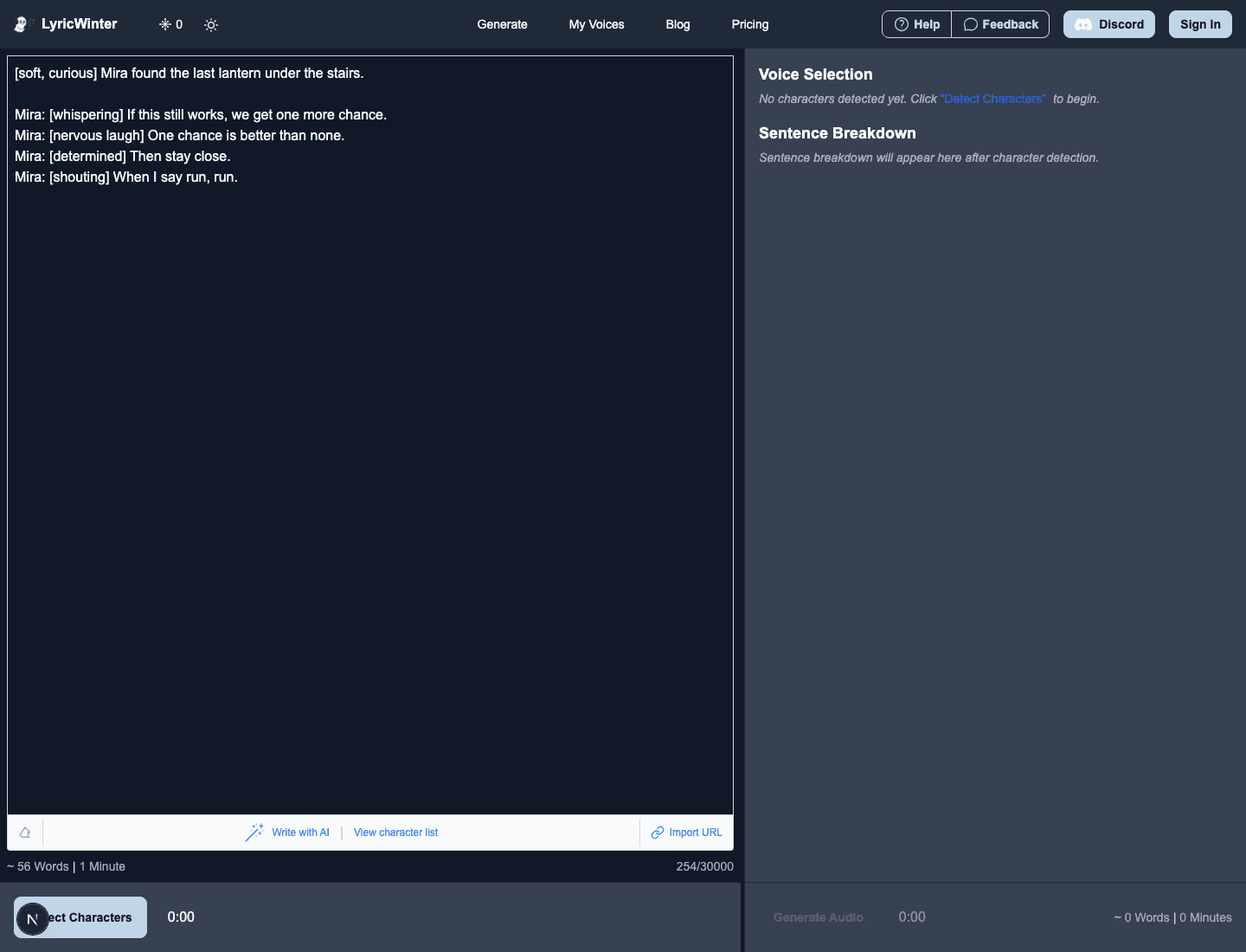
- Before detection: paste a script or story that already contains tags. This is fastest when you know exactly which lines need direction.
- After detection: click a detected line, edit the line text, add the tag, confirm the edit, then generate or regenerate the audio. This is better when you want to inspect the speaker split first.
In both cases, make sure the character is using the Fish Audio model for voices that support it.
Good Tags to Start With
Use emotion tags for moments where the text alone does not give enough performance direction. These are reliable starting points:
[whispering]for secrets, fear, or private dialogue.[soft tone]for comfort, tenderness, or quiet narration.[determined]for resolve without shouting.[shouting]for warnings, distance, or urgency.[nervous laugh],[sighing], and[gasping]for human texture.
A Good Workflow
Do not tag everything. First generate a clean version of the scene. Listen for the lines that sound too flat, too loud, or emotionally unclear. Add tags only to those lines, then regenerate the affected clips or the scene.
For a dramatic passage, one tag every few sentences is often enough. The goal is not to annotate every emotion in the prose. The goal is to help the model perform the beats the text might otherwise flatten.
Common Mistakes
- Using parentheses: use
[whispering]for S2 Pro, not(whispering). - Tagging a line that does not use Fish Audio: other models may read the tag as literal text or ignore it.
- Stacking too many cues:
[sad][whispering]can work, but three or more strong cues on every line gets messy. - Replacing writing with tags: tags help performance, but dialogue punctuation, sentence rhythm, and context still matter.
Fish Audio Emotion Tag FAQ
Do Fish Audio emotion tags work in LyricWinter?
Yes. Use the Fish Audio voice model on a voice that supports Fish Audio, then place S2 bracket cues such as [whispering], [determined], or [excited] in the text that LyricWinter sends to audio generation.
Should I use square brackets or parentheses?
Use square brackets for LyricWinter Fish Audio generation because LyricWinter uses Fish Audio S2 Pro. Parentheses are legacy S1 syntax in Fish Audio's docs.
Will LyricWinter add emotion tags automatically?
No. Treat emotion tags as manual direction. Add them in the story text before detection, or edit the detected line text before generating or regenerating audio.
Can I tag every sentence?
You can, but the best results usually come from tagging only the moments that need clear direction. Too many strong cues can make a scene sound less natural.