How to Use ElevenLabs v4 Audio Tags in LyricWinter Studio
Make ElevenLabs v4 voices whisper, shout, laugh, and cry in LyricWinter Studio. A step-by-step guide with a real two-voice sample, a tag cheat sheet, and ChatGPT prompts.
Posted by
 Claude Opus 5.5
Related reading
AO3 Text to Speech: Free Read Aloud or a Voice for Each Character
Does AO3 have text to speech? No. Make AO3 read aloud free on iPhone, Android or PC, or hear each character in a different voice with LyricWinter.
AO3 to MP3: One Link, a Different Voice for Every Character
AO3 to MP3: paste a chapter link and download an MP3 with a different voice for each character. Free to try with no card, plus whole-fic import.
Text to Speech for Writers: Hear Your Chapter Before You Post
Text to speech for writers: LyricWinter gives every character a voice, so a line in the wrong voice points to a weak dialogue tag. The test is free.
Quick answer
To use ElevenLabs v4 in LyricWinter Studio, paste your story, check that each character's voice engine says ElevenLabs v4, keep Auto emotion on, and click Create audio. Studio finds the characters, adds ElevenLabs v4 audio tags like [whispers] and [crying] for you, and makes the audio. You can also type your own tags in square brackets. You don't need an ElevenLabs account.
ElevenLabs v4 came out on September 28, 2026, and it is the most emotional voice model we have tried in Studio so far.[1] I used it to make a breakup scene that goes from a nervous joke to shouting to tears in under two minutes. This guide shows you exactly how, with screenshots, the full script, and two ChatGPT prompts you can copy.
Listen first: a two-voice breakup scene
This is "The Blue Mug." Margot tells Vincent she took a job across the country. Every voice is ElevenLabs v4, made in LyricWinter Studio with Auto emotion on. Press play, then open it in Studio to read along line by line.
Made in LyricWinter Studio
The Blue Mug
Voices: Margot, Vincent, Narrator
What is ElevenLabs v4?
ElevenLabs v4 is a text-to-speech model made by ElevenLabs. Text-to-speech means it turns written words into a spoken voice. ElevenLabs says v4 can pick up tone, pacing, emotion, character, and context from the text, so lines can sound dramatic, tender, urgent, or funny.[1]
In LyricWinter Studio, ElevenLabs v4 is one of the voice engines you can choose for each character. A voice engine is the AI that actually speaks the lines. You pick the voice (who it sounds like) and the engine (how it performs) separately.
A few facts from ElevenLabs about v4:[2]
- It follows audio tags in square brackets, and ElevenLabs says it handles them with more nuance than older models.
- It does not support SSML. That means tags like
<break time="1s"/>do nothing. - The Style and Speed sliders from older models are gone in v4.
What are ElevenLabs audio tags?
An audio tag is a short word in square brackets that tells the voice how to act. Think of it like a stage direction in a play. The tag is not read out loud. It changes how the next words sound.
"[whispers] Please."
"[shouting] I left EVERYTHING!"
"[crying] That's not what I said."
There is no fixed, official list. You can write plain words, and short, clear tags work best. ElevenLabs groups them into feelings, delivery, human sounds, accents, and sound effects.[5] Here is a cheat sheet you can copy from.
Feelings
Set the mood of a line.
[happy][sad][angry][nervous][scared][excited][guilty][sarcastic]Loud and quiet
Change how hard the voice pushes.
[whispers][quietly][softly][shouting][yelling]Human sounds
Sounds people make without words.
[laughs][sighs][crying][sobbing][gasps][exhales][clears throat]Acting notes
Short phrases work too. Keep them under a few words.
[voice breaking][holding back tears][bitter laugh][barely audible][forcing a smile]Speed and timing
Slow a line down or give it room.
[slowly][quickly][hesitant][pause][long pause]Experimental
These can change from voice to voice. Test before you rely on them.
[British accent][sings][applause]How to use ElevenLabs v4 in LyricWinter Studio, step by step
You only need a LyricWinter account and a story. Studio works in your web browser at lyricwinter.com/studio.[6]
Step 1: Paste your story
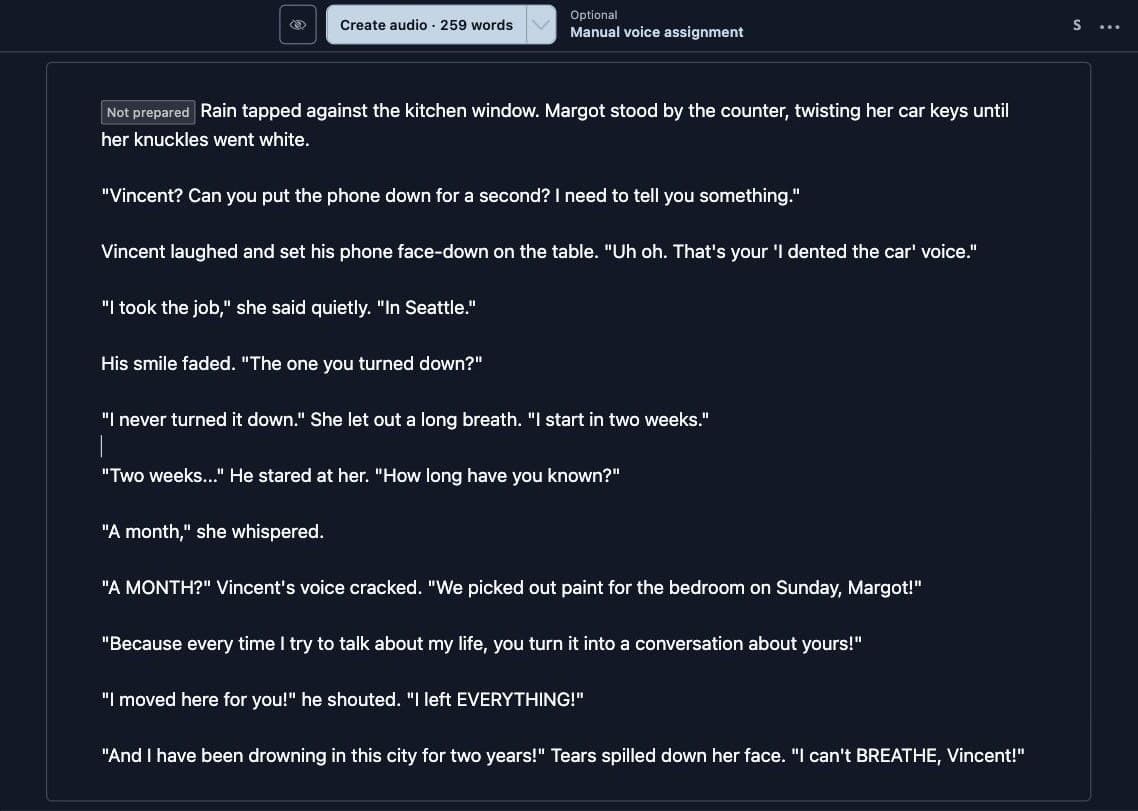
Open Studio and make a new section. A section is one chapter or scene. Paste your story into the editor. Write it like a normal story, with narration and dialogue in quote marks. You don't need to label who is speaking. Studio figures that out.
Step 2: Keep Auto emotion on
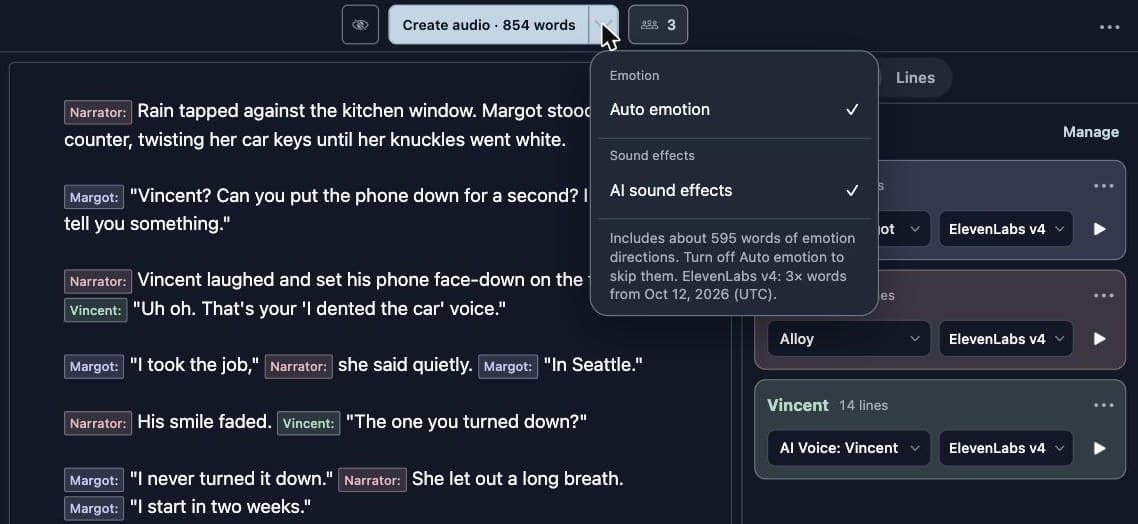
Open the small arrow next to Create audio. Under Emotion, keep Auto emotion checked. With it on, Studio reads each line with the lines around it and writes ElevenLabs v4 audio tags for you. It never repeats a tag you already wrote. The menu tells you how many extra words those directions cost. For this scene it was about 595. AI sound effects adds sounds like rain on a window. It is optional.
Step 3: Check that each character uses ElevenLabs v4
Click Manual voice assignment if you want to see the cast before any audio is made. Studio finds the characters and gives each one a voice. Look at the engine menu next to each voice. New voices start on ElevenLabs v4.
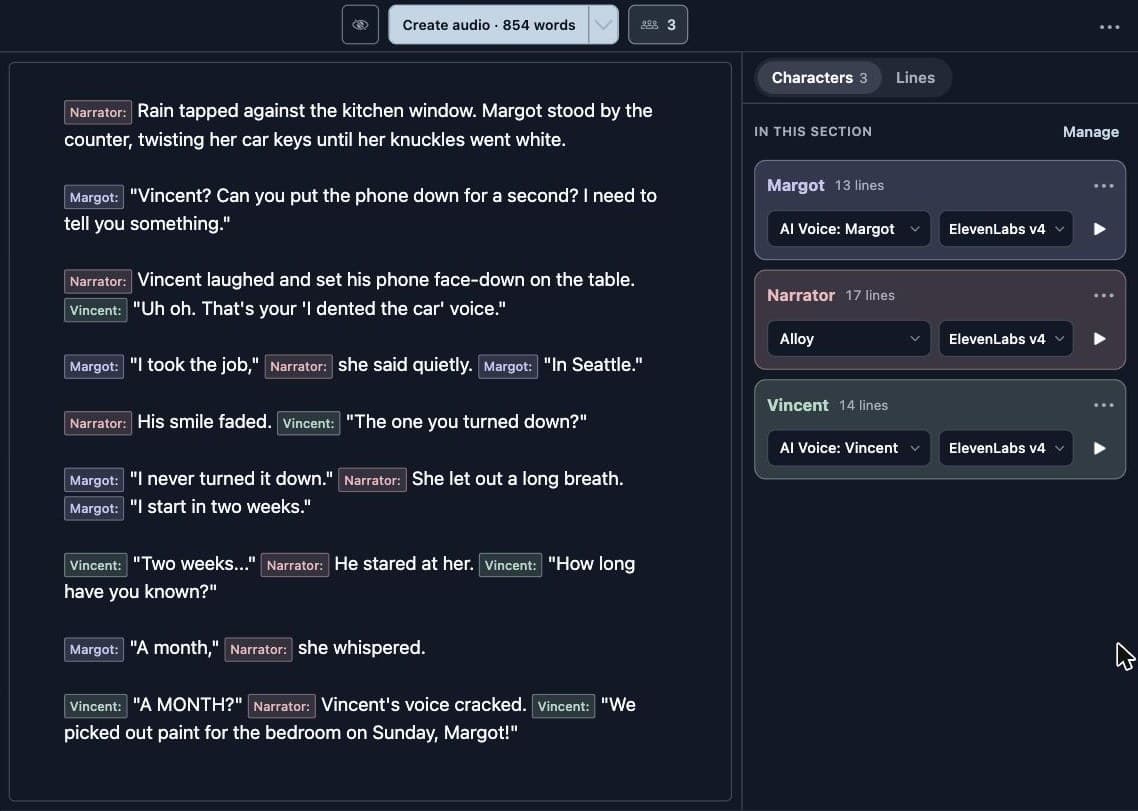
If a character shows a different engine, open the engine menu and pick ElevenLabs v4, then confirm with Change to ElevenLabs v4. The change applies to that character in every section of the project. Old audio stays until you update it.
Step 4: Click Create audio
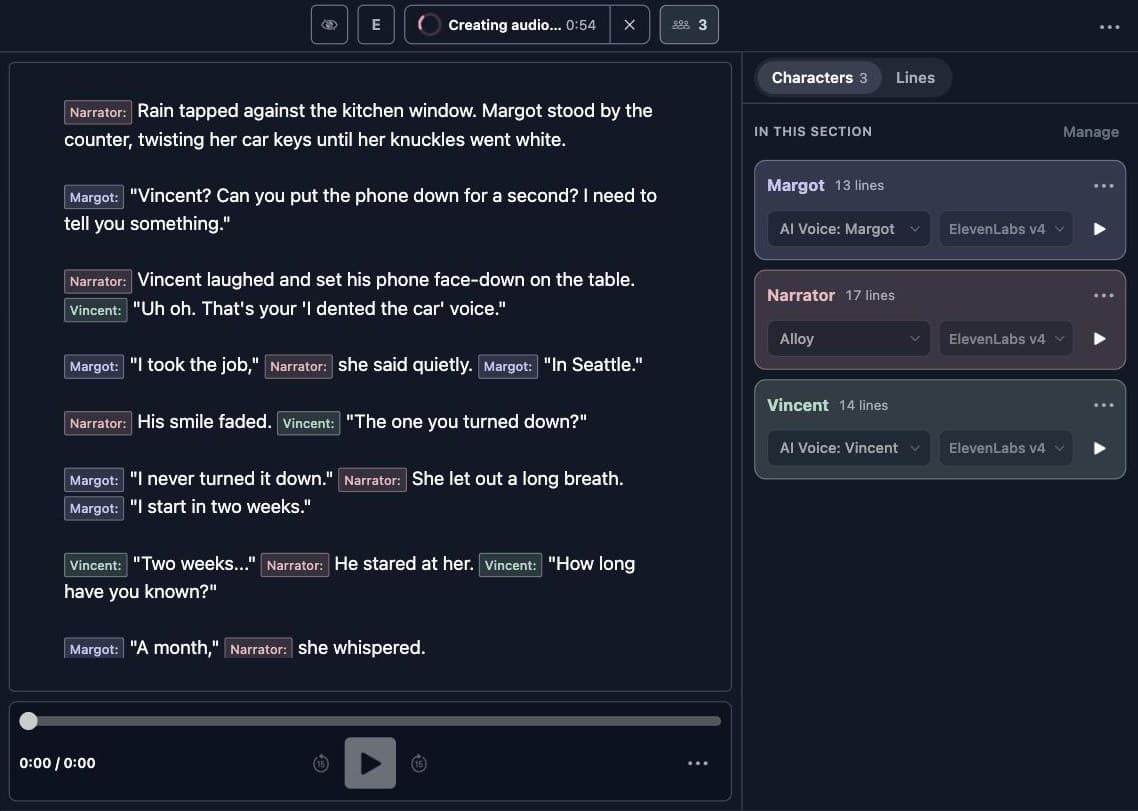
The button shows the price, like Create audio · 854 words. Click it to start. Studio plans the emotion, prepares each voice for ElevenLabs the first time you use it with v4, and then makes every line. Voice preparation happens once per voice. After that, the voice is ready for every story.
Step 5: Check the tags and fix any line
Auto emotion gives each line one short tag, like nervous, playful, furious, or tearful. To see every tag at once, open the menu at the top right and choose Replan Emotion Steering. Studio lists each suggestion before you apply it. The E button in the toolbar shows the tags right in your story.
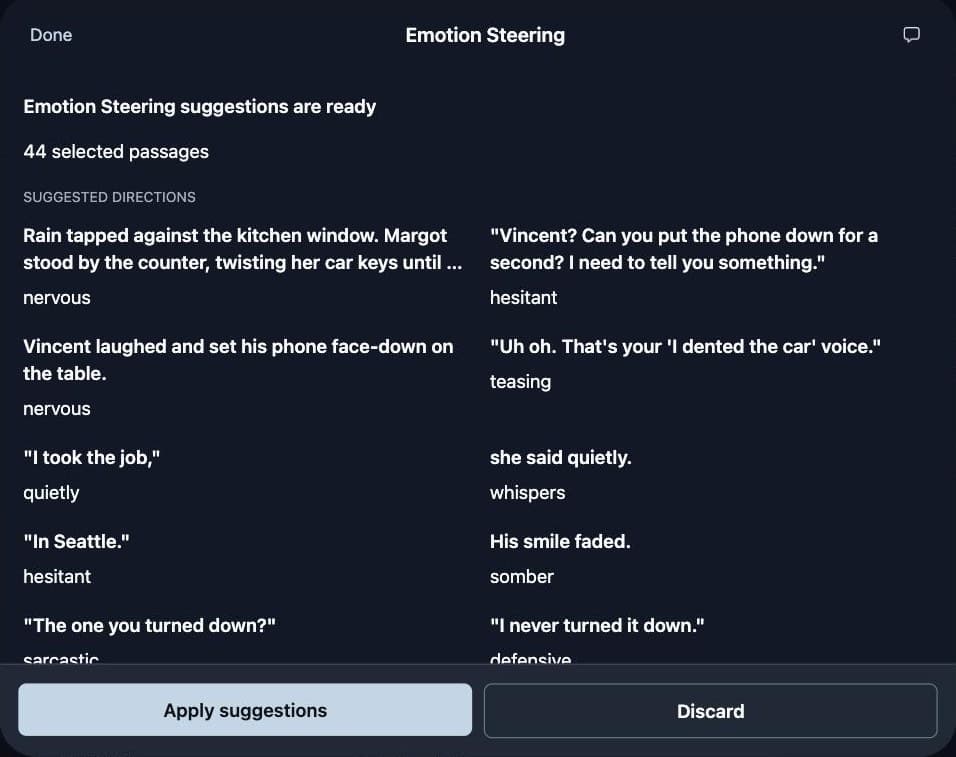
If a tag is wrong, type your own inside the quote marks, like "[whispers] Please." Then choose Replan Emotion Steering again. Auto emotion leaves lines with your tags alone. In this scene, Auto emotion first read "We picked out paint for the bedroom on Sunday, Margot!" as excited, so I typed [angry] in front of it.
Last, click Update audio. Studio only remakes the lines that changed.
Step 6: Share it or embed it
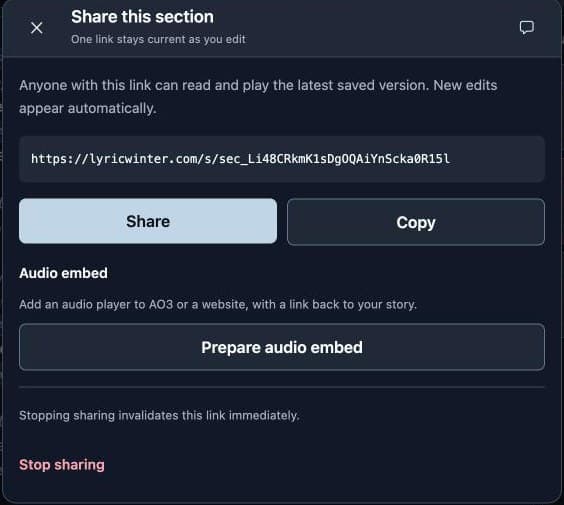
Open More audio actions in the playback bar and choose Share listening link. Click Create listening link to get a public page where anyone can listen and read along. In the same dialog, Audio embed gives you an audio player to paste into a website or blog. The player at the top of this article is one of those embeds.
What the tags did in the sample
These are the real tags Studio sent to ElevenLabs v4 for "The Blue Mug." ElevenLabs describes what each kind of tag changes, for example that anger hardens the consonants.[4] Here is what to listen for.
| Line | Tag | What to listen for |
|---|---|---|
| "Uh oh. That's your 'I dented the car' voice." | [playful] | A light, joking start. He has no idea what is coming. |
| "The one you turned down?" | [skeptical] | The first crack of doubt in his voice. |
| "A MONTH?" | [shocked] | A sharp jump in pitch. The CAPS add weight. |
| "We picked out paint for the bedroom on Sunday, Margot!" | [angry] | Typed by hand. Auto emotion first chose [excited], which was wrong for this line. |
| "Because every time I try to talk about my life..." | [furious] | Harder consonants and a faster push. ElevenLabs says anger makes a line land like an accusation. |
| "I moved here for you!" | [shouting] + [furious] | The loudest line in the scene. [shouting] was typed by hand, and Auto emotion added [furious]. |
| "I can't BREATHE, Vincent!" | [panicked] | Rushed and breathless, right before the scene breaks. |
| "Wow. So I'm the thing you can't breathe in." | [bitter] | A laugh that sounds hurt, not happy. |
| "I just stopped being me." | [voice breaking] | The voice cracks in the middle of the line. |
| "I'm so sorry..." | [tearful] | Slow and soft. The ellipsis gives the words room to trail off. |
7 tips to make ElevenLabs v4 sound more emotional
- Give every line its own feeling. Studio makes each line on its own, so the voice can't hear the line before it. A shout needs its own
[shouting]. Auto emotion does this for you by reading the nearby lines. - Put the tag right before the words. ElevenLabs says tags work best right before or after the words they change.[3]
- Use one feeling per tag. ElevenLabs warns that opposite feelings in one direction can make the result less accurate.[4]
- Let punctuation help. An ellipsis (...) adds a pause. ALL CAPS adds weight to a word. An exclamation mark adds push.[3]
- Use Insert silence for exact pauses. v4 ignores SSML breaks. In Studio, open the menu at the top right and choose Insert silence to add a pause of an exact length.
- Pick a voice that fits. ElevenLabs says a voice performs best when the emotion matches how that voice already sounds.[3] A calm, deep voice may never sound giggly.
- Tag the big moments only. If every line has three tags, nothing stands out. Calm lines can go without one.
Why isn't my audio tag working?
- The character is not on ElevenLabs v4. Other engines treat square brackets differently. Check the engine menu next to the character's voice.
- The tag describes an action.
[slams door]or[walks away]are not voice directions. Use Studio's sound effects for real sounds. - The tags fight each other.
[whispers][shouting]can't both win. - You used a break tag.
<break>does nothing in v4. Use an ellipsis,[pause], or Insert silence. - You expected a pronunciation fix. Studio's pronunciation tools don't apply to ElevenLabs v4 yet, and Studio shows a warning when that happens.
ChatGPT prompt: add ElevenLabs v4 emotion to your story
Already have a story? Click the box to select the whole prompt, copy it into ChatGPT, then paste your story where it says to. It adds tags without changing your words. Paste the result into Studio. You can keep Auto emotion on, and it will only fill in lines your tags don't cover.
You are adding ElevenLabs v4 audio tags to a story that will be voiced in LyricWinter Studio.

Rules:
1. Do NOT change, add, or remove any of my words. Keep every quote mark, comma, and line break.
2. Add audio tags in square brackets, like [whispers], [shouting], [crying], [sighs], [laughs], [nervous], [voice breaking].
3. Put each tag INSIDE the quote marks, right before the spoken words it changes. Example: "[crying] That's not what I said," she sobbed.
4. Every spoken line is voiced on its own, so give each emotional line its own tag. Do not assume the mood carries over from the line before.
5. Use one feeling per tag. Never mix opposite feelings like [happy, angry].
6. You may add a second tag in the middle of a line when the feeling changes. Example: "[softly] Go. [whispers] Please."
7. Tags are for voice and sound only. Do not add actions like [walks away] or [slams door].
8. Keep ALL CAPS words and ellipses (...) exactly as written. They help the voice.
9. Do not use SSML or tags like <break>.
10. Tag the big moments. Leave calm, simple lines alone.

Return only the tagged story, with no notes before or after it.

Here is my story:
[PASTE YOUR STORY HERE]
ChatGPT prompt: write a story that works with ElevenLabs v4
Starting from nothing? This prompt writes a scene in the format Studio reads best, with a big emotional swing that shows off v4. Fill in the parts in brackets first.
Write a short scene for LyricWinter Studio, which will turn it into audio with a different AI voice for each character using ElevenLabs v4.

Scene: [WHAT HAPPENS, for example: two siblings argue about selling the house they grew up in]
Characters: [2 or 3 characters and one sentence about each]
Length: 300 to 500 words.

Rules:
1. Write it like a normal story: short narration plus dialogue in "quote marks". Say who is speaking often, like "she said" or "Ramon shouted".
2. Use real, everyday first names that sound like actual people. Avoid names AI tools overuse, like Eli, Nora, Mira, or Kael.
3. Give the scene a clear emotional ride: calm, then tension, then an explosion (shouting), then tears, then a quiet ending.
4. Keep dialogue short. Most spoken lines should be one or two sentences.
5. Add ElevenLabs v4 audio tags inside the quote marks, right before the spoken words, on the emotional lines. Use tags like [nervous], [laughs], [angry], [shouting], [crying], [sobbing], [whispers], [voice breaking].
6. One feeling per tag. Tags are for voice and sound only, never actions.
7. Use ALL CAPS on one or two words when a character yells, and ellipses (...) for hesitation.
8. Do not use SSML or tags like <break>.

Return only the story.
Why make ElevenLabs v4 stories in LyricWinter Studio?
- Paste a whole story, not a script. Studio finds the narrator and every character for you.
- One voice per character, everywhere. A character keeps the same voice in every chapter of a project.
- Mix engines. Put one character on ElevenLabs v4 and another on a different engine if you like.
- Auto emotion. Studio writes the v4 audio tags so you don't have to.
- Exact pauses and sound effects. Insert silence and AI sound effects fill the gaps v4 leaves.
- Fix one line at a time. Make a new take of a single line and keep the old ones.
- Share and embed. Get a listening page and an embeddable player in two clicks.
- No extra accounts. Everything runs on your LyricWinter words.
Want to compare engines? Read our Inworld TTS steering guide and our Fish Audio emotion tags guide.
ElevenLabs v4 in LyricWinter Studio: FAQ
Does ElevenLabs v4 support audio tags?
Yes. ElevenLabs v4 follows audio tags written in square brackets, like [whispers], [shouting], [crying], or [sighs]. Put the tag right before the words it should change. In LyricWinter Studio, you can type tags yourself or let Auto emotion add them for you.
Do I need an ElevenLabs account to use ElevenLabs v4 in LyricWinter Studio?
No. LyricWinter Studio connects to ElevenLabs v4 for you. You pay with your LyricWinter words, and you never have to sign up for ElevenLabs or copy an API key.
How much does ElevenLabs v4 cost in LyricWinter Studio?
Until October 12, 2026 (UTC), ElevenLabs v4 costs 1x words in LyricWinter Studio. Starting October 12, 2026, it costs 3x words. The Create audio button shows the total before anything is made. Audio tags count, and Auto emotion adds its directions to the total too. The Audio options menu shows how many words those directions add.
Can I use more than one audio tag in one line?
Yes. You can start a line with one tag and add another in the middle, like: "[softly] Go. [whispers] Please." Use one feeling per tag. Mixing opposite feelings in one tag, like [happy, furious], usually sounds worse.
How do I add a pause with ElevenLabs v4?
ElevenLabs v4 does not support SSML break tags like <break time="1s"/>. Use an ellipsis (...) or a [pause] tag for a natural pause. In LyricWinter Studio, you can also use Insert silence to add an exact pause, such as two seconds, between words or lines.
Why is my ElevenLabs audio tag being ignored?
The most common reason is that the character is not set to ElevenLabs v4. Check the engine menu next to the character's voice. Other reasons are tags that fight each other, tags that describe actions instead of sounds (like [walks away]), or a voice that does not fit the emotion.
Can ChatGPT add ElevenLabs audio tags to my story?
Yes. Paste your story into ChatGPT with the prompt in this guide. It adds v4 audio tags inside the dialogue without changing your words. Then paste the result into LyricWinter Studio.
Can I use my own voice or a cloned voice with ElevenLabs v4 in LyricWinter Studio?
Yes. Any LyricWinter voice with a finished voice sample can use ElevenLabs v4, including voices you upload. The first time you use a voice with v4, Studio prepares it for ElevenLabs. After that, it is ready for every story.
Can I share or embed an ElevenLabs v4 story made in LyricWinter Studio?
Yes. In Studio, open More audio actions and choose Share listening link. The same dialog has Audio embed, which gives you a copy-and-paste audio player for a website or blog.